What is SNMP
Most components in a network such as routers, firewalls and servers can keep their operational status/statistics in something called 'Management Information Blocks' (MIBs). Each statistic has an 'Object Identifier' that can be retrieved remotely from the MIB via 'Simple Network Management' (SNMP). For security reasons, you need to know a password called a "community string". There are several different types of 'community strings', the most common is the one that is used only for reading ('Read Only') often this is set to the word "public". There is also a password that not only allows reading but also updating the parameters as well, often this is set to "private".
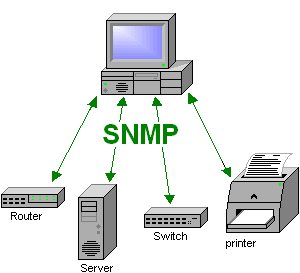
Making SNMP requests.
If you plan to use your Linux box to query your network components, other servers, or maybe the box you are currently using, then you must have an SNMP toolkit.
SNMP on LINUX
Some distributions (e.g. RedHat) have the NetSNMP package installed from the start, in order for the machine to provide SNMP service, it must be installed elsewhere (for Debian it is called snmpd). The SNMP daemon is configured in the file /etc/snmp/snmpd.conf, among other things you can set the "community string" there. The version that comes with the installation is very complicated, to make it a little easier for yourself, I suggest that you save the original file and use a much simpler version with only one line containing the keyword "rocommunity" followed by the password.
Save the original configuration.
[root@pluto snmp]# cd /etc/snmp/
[root@pluto snmp]# mv snmpd.conf snmpd.conf.old
[root@pluto snmp]# vi snmpd.conf
Enter the following line in the new config file to set the "Read Only community string" to "thunbergs".
rocommunity thunberg
For some distributions (if the installer did not do so) you must now configure Linux to start SNMP on every reboot of the machine.
[root@pluto root]# chkconfig --level 345 snmpd on
[root@pluto root]#
[root@pluto root]# /etc/init.d/snmpd start
Starting snmpd: [ OK ]
[root@pluto root]#
[root@pluto snmp]# snmpwalk -v 1 -c thunberg localhost system
SNMPv2-MIB::sysDescr.0 = STRING: Linux pluto 2.4.18-14 #1 Wed Sep 4 21:57:57 EDT 2005 i586
SNMPv2-MIB::sysObjectID.0 = OID: NET-SNMP-MIB::netSnmpAgentOIDs.10
SNMPv2-MIB::sysUpTime.0 = Timeticks: (425) 0:00:04.25
SNMPv2-MIB::sysContact.0 = STRING: root@localhost
SNMPv2-MIB::sysName.0 = STRING: bigboy
...

...

...

[root@pluto snmp]# snmpwalk -v 1 -c craz33guy localhost interface
IF-MIB::ifNumber.0 = INTEGER: 3
IF-MIB::ifIndex.1 = INTEGER: 1
IF-MIB::ifIndex.2 = INTEGER: 2
IF-MIB::ifIndex.3 = INTEGER: 3
IF-MIB::ifDescr.1 = STRING: lo
IF-MIB::ifDescr.2 = STRING: wlan0
IF-MIB::ifDescr.3 = STRING: eth0

...

...

...

[root@pluto snmp]#
Now we know that SNMP works on this LINUX box and we can start setting up SNMP statistics collecting packages such as MRTG to create nice diagrams etc.
SNMP on other components.
Above we 'polled' localhost but you can access data from any component that has SNMP running. All you need is an IP address and a "community string" to get similar results, if you don't know the community string try "public". Here is an example:[root@pluto snmp]# snmpwalk -v 1 -c public 192.168.0.120 interface
Simple SNMP Troubleshooting
If your SNMP attempts fail, check:
- are you using the correct "community string"?
- If you are going through a firewall, adjust it.
- "TCP wrappers" configuration on the SNMP target machine must allow SNMP queries from the machine you are running. That is, make sure /etc/hosts.allow and /etc/hosts.deny are empty.
- Check that the routing between the client and the target machine is correct. A simple "ping" or "traceroute" test should be enough.
SNMP on Windows
More will come when I have time.......
MRTG
What is MRTG?
More will come when I have time.......