💼Briefing Document: Gallery Protect System
This document provides a comprehensive description of the "Gallery Protect" system, a lightweight, file-based security framework designed to protect web content. The system's architecture is centered on a Synchronous Gatekeeping strategy, which employs a multi-layered perimeter defense without relying on a traditional SQL database.
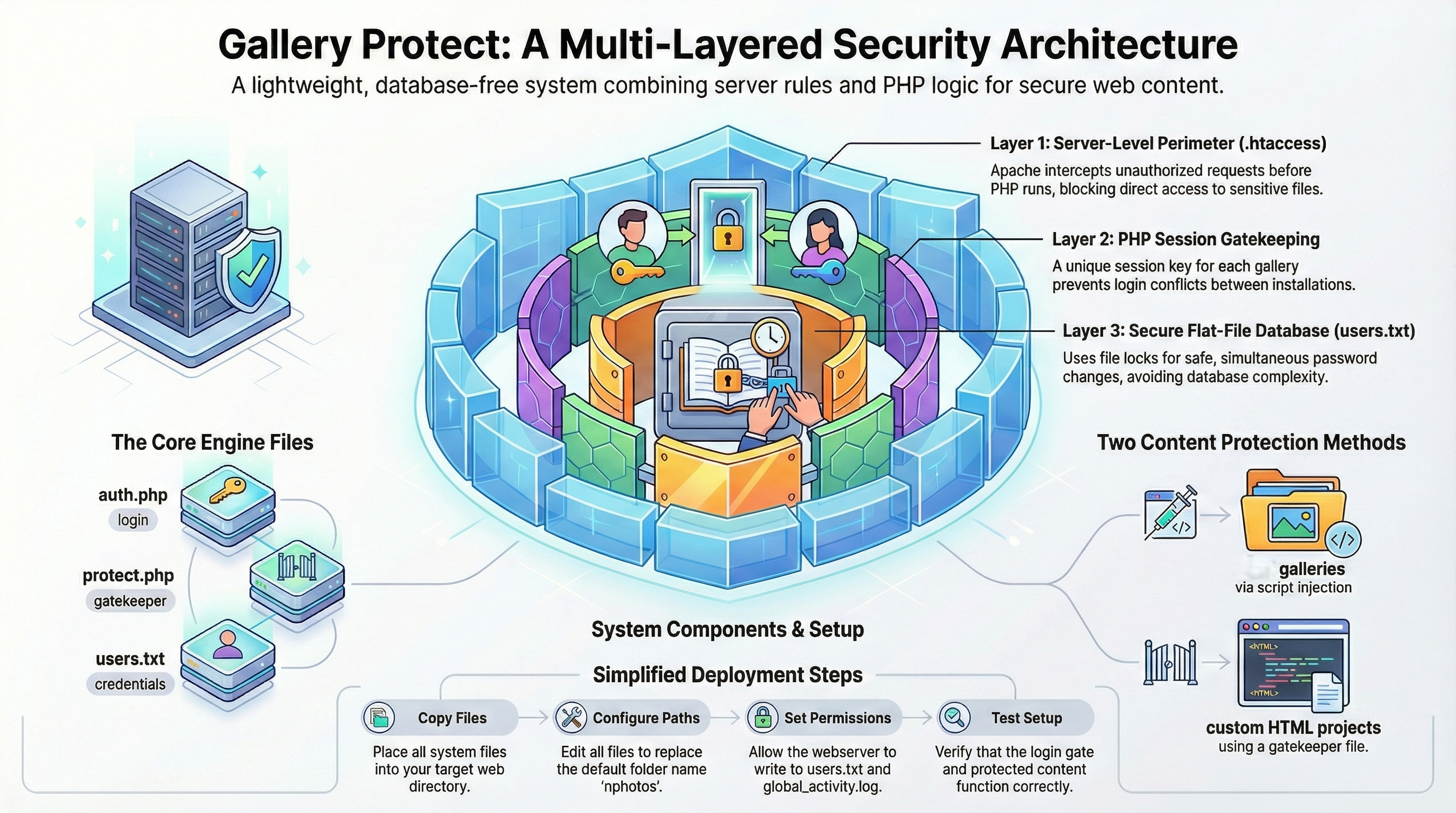
Summary
The first layer of defense is
established at the server level via Apache .htaccess rules,
which intercept unauthorized requests, redirect traffic to an
authentication gate, and block direct browser access to sensitive
data files such as users.txt and
global_activity.log. The second layer
consists of PHP session logic, which uses a "Kill
Protocol" to terminate page execution instantly if a valid
session token is not present. A key architectural feature is
Namespace Isolation, which prefixes all session variables with
a unique folder ID, allowing multiple independent galleries to
operate on the same server without session conflicts.
The system utilizes a flat-file
database (users.txt) for user
credentials, employing atomic file-locking (LOCK_EX)
to prevent data corruption during password changes. It features
robust Unicode-aware validation to support international characters
while maintaining database integrity. Integration with content
systems like the h5ai gallery is achieved through JavaScript
injection, while custom HTML projects are secured using a protect.php
gatekeeper script. Common operational challenges, such as path
resolution errors and aggressive browser caching, are addressed with
specific troubleshooting protocols, including "Hard Refresh"
procedures and "Version Bumping" for static assets.
System Architecture and Core Principles
The Gallery Protect system is built on a "Synchronous Gatekeeping" strategy, which uses the server's file system and session memory to create a robust, multi-layered security perimeter. This approach avoids the overhead of a database server.
Multi-Layered Security Model
The system's defense is structured in three distinct layers, processing each request sequentially.
Layer 1: The Request Interceptor (.htaccess) This is the "Hard Perimeter" managed by the Apache web server, acting before any PHP code is executed.
Traffic Rerouting: It intercepts
403 Forbiddenerrors and redirects all unauthorized traffic to the centralauth.phplogin gate.Resource Stealth: It explicitly denies direct HTTP requests for sensitive data files, including
users.txt(credentials) andglobal_activity.log(activity log), ensuring they cannot be accessed even by authenticated users via a direct URL.
Layer 2: Namespace Isolation & Session Logic This layer is managed by PHP and is responsible for stateful authentication.
Namespace Isolation: To support multiple, independent gallery instances on a single server (e.g.,
/photos/,/vacation/), all session keys are dynamically prefixed with a unique folder ID defined inconfig.php($MY_FOLDER_ID). This prevents session "cross-talk" between instances.auth_[folder_id]: The primary validation token.active_user_[folder_id]: The identity token holding the username.last_page_[folder_id]: A memory token to return users to their last visited page after login.
The "Kill" Protocol: Every protected page must include the
auth.phpengine as its first line. This script checks for the existence and validity of theauth_session key. If the key is missing or expired (default 24 hours), the script immediately executesexit;, terminating the process and preventing any protected content from being sent to the browser.
Layer 3: The Flat-File Database (users.txt) The system uses a simple text file for credential storage, optimized for speed and integrity.
High-Speed Parsing: Credentials are read into memory and parsed using PHP's
explode(':', $line)function, enabling rapid lookups without a persistent database connection.Atomic Integrity: Password updates are performed using an exclusive lock (
LOCK_EX) on theusers.txtfile. This prevents race conditions where simultaneous writes could corrupt or empty the file.Sanitization: Usernames are normalized to lowercase for case-insensitive matching, while passwords remain strictly case-sensitive and support Unicode characters.
Core Components and File Manifest
The system is composed of several key PHP scripts, configuration files, and data stores that work in concert to provide access control.
File/Directory |
Role & Function |
|
The central engine. Manages sessions, validates credentials
against |
|
Configuration hub. Defines the |
|
A dedicated content gatekeeper for the |
|
User utility for updating |
|
An AJAX endpoint that serves as a read-only session identity provider for the h5ai user interface. |
|
The admin dashboard. Displays activity logs with features like "Auto-Trim" (to 2000 lines), "Smart Dates", and a scrollable history view. |
|
Global session terminator. Redirects users back to their last page
or to the monitor if initiated from there ( |
|
The user database, storing credentials in a |
|
The system-wide activity log, recording timestamp, folder, user, IP, action, and login start time. |
|
Directory for user profile pictures ( |
|
A target directory for securing custom HTML projects, using
|
|
The primary directory for h5ai gallery content and the system's integration scripts. |
Security Implementation via
.htaccess
Server-level .htaccess
configurations are critical to the system's security, providing
preemptive protection for sensitive data and content.
Root Directory (
/.htaccess):Configures the server to redirect all
403 Forbiddenerrors to the system's master authentication gate:ErrorDocument 403 /nphotosjj/auth.php?error=403.
System Core (
/nphotosjj/.htaccess):Data Protection: Blocks all direct web access to files with
.txt,.log,.conf,.sh, and.incextensions.Asset Whitelisting: Explicitly permits access to necessary web assets like
.php,.jpg,.png,.css, and.js.Anti-Caching: Sets headers (
Cache-Control: no-cache,Pragma: no-cache,Expires: 0) for dynamic assets (.php,.js,.css) to prevent browsers from serving stale session states or UI components.
Protected HTML Content (
/protected_html/.htaccess):Fragment Protection: Implements a specific rule to deny direct browser access to files ending in
_content.php. This prevents users from bypassing theprotect.phpgatekeeper and viewing content fragments directly, while still allowing the server to include them via PHP.
h5ai Albums (
/nphotosjj/albums/.htaccess):Anti-Hotlinking & Deep-Link Protection: This configuration protects media files (images, videos, documents) from being directly accessed or embedded on other sites. It checks the
HTTP_REFERERand redirects requests to anaccess_denied.phppage if the referrer is missing or does not match the allowed domain.
User and Session Management
The system includes detailed logic for handling user credentials, password changes, and session state across various user interactions.
Credentials and Password Management
Validation Logic: The system uses a "Unicode-Aware Validation" layer. It employs
mb_strlen($p, 'UTF-8')to correctly count characters in multi-byte strings (e.g., Swedishåäö) and uses a Unicode-enabled regular expression (/^[^\s:]+$/u) to permit these characters while strictly forbidding spaces and the colon (:) delimiter.Atomic Updates: The
change_password.phpscript writes updated user data tousers.txtusingfile_put_contentswith theLOCK_EXflag, ensuring the write operation is atomic and safe from race conditions.Protected Accounts: User accounts can be marked as "Read-Only" in
users.txtby appending a*to the username. The password change script detects this suffix and blocks any modification attempts for that account.
Session and Logout Logic
Dynamic Logout: The
protect.phpscript unsets thelast_pagesession variable before redirecting the user back to the current URI, ensuring a clean state. The globallogout.phpscript redirects users to their last visited page, unless the logout was triggered from the monitoring dashboard (?from_monitor=1), in which case it returns to the dashboard.Multi-Tab Session Suppression: To prevent background AJAX polls from overwriting the user's intended return path, the
user_info.phpendpoint is explicitly prohibited from writing to the$_SESSION['last_page_nphotos']variable.
System Integration and Administration
The framework is designed for integration with other web applications and provides tools for administration and troubleshooting.
Integration Methods
h5ai Gallery (Native Injection): The system integrates with the h5ai gallery by including
auth.phpat the top of h5ai's main index file. The UI is enhanced viacustom_ui.js, which pollsuser_info.phpevery 60 seconds to fetch the current user's identity and display it in the h5ai interface. The scripts and styles for this integration are loaded viaoptions.json.Custom HTML (Gatekeeper Proxy): For standalone HTML projects, the
protect.phpscript acts as a gatekeeper. It wraps content fragments (e.g.,_content.php) within the security session, ensuring that only authenticated users can view the content.
Administration and Troubleshooting
Monitoring: The
monitor.phpdashboard provides an administrative view of theglobal_activity.log. It features an "Auto-Trim" function that truncates the log to 2000 lines if it grows beyond 2200, and a "Smart Date" display that shows time only for today's entries and full date/time for older ones.Troubleshooting Caching Issues: Aggressive browser caching (notably in Microsoft Edge) can cause UI or logic changes in
.jsand.cssfiles to not apply immediately. The recommended solutions are:Hard Refresh: Forcing the browser to bypass its cache (
Ctrl+F5orCmd+Shift+R).Version Bumping: For a permanent, user-wide fix, incrementing a version query string in
options.json(e.g.,"custom_ui.js?v=10.62").
Deployment and Cloning: A detailed checklist is provided for migrating or duplicating the system. This involves a search-and-replace operation across PHP files,
.htaccessconfigurations, and h5ai bridge files to update the hardcoded folder ID ($MY_FOLDER_ID) and associated paths. A final permission audit on data and cache files is required.